Outlook Archive Slow? Stop Waiting on One PC
An Outlook archive slow enough to take the afternoon is a familiar freeze. The progress bar barely moves. Outlook has to stay open. Closing the laptop stops the job. The mailbox you were trying to shrink is still full when you come back.
That wait is the archive method, not a sign that the mail itself is stuck.
Why an Outlook archive is slow
Outlook for Windows stores an archive as a data file on that one computer. Microsoft describes the feature in Archive in Outlook for Windows. Before a message can land in that file, Outlook has to download it. A mailbox full of quotes, drawings, and years of Sent mail means thousands of those downloads, one after another.
Three things make an Outlook archive slow in practice:
- It is tied to one PC. The file Outlook is writing does not exist on your phone or on another computer. Those devices only get faster after the server copy is gone, and only for the mail that remains.
- IMAP makes each message a round trip. Hosted mail from a web host, cPanel, or a company server keeps the message on the server until a program fetches it. Outlook is fetching, saving, and then removing, for every old message.
- Outlook has to keep running. Sleep the computer, or let the window stall, and the job stops where it was.
People also ask whether archiving makes Outlook faster. A smaller mailbox can. The archiving step itself is the long part.
Microsoft 365 has a separate feature called an online archive. That lives on Microsoft’s servers and is a different wait, with different settings. Treeoge does not connect to Microsoft 365 or Outlook.com, so this page is about Outlook on a Windows PC archiving an IMAP mailbox.
Leave the archive running without babysitting Outlook
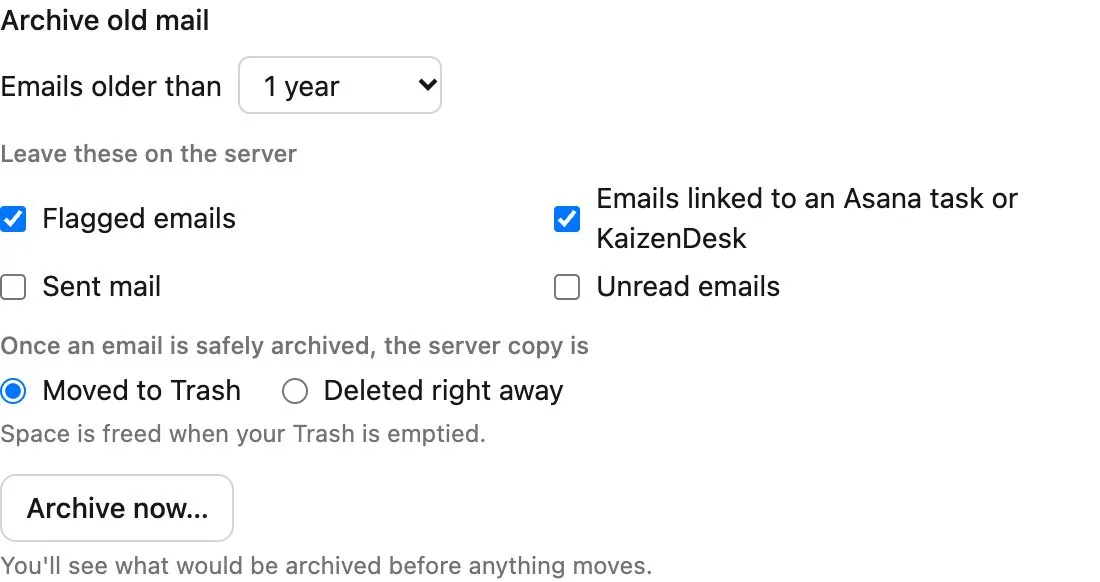
Treeoge connects to the IMAP mailbox you already have. Your address stays at the host. On the storage page you choose how old the mail must be, then click Archive now. A preview shows how many messages would move, and how full the box would be after. Nothing moves until you start it.
The copy runs in the background. A progress line shows how many messages are done, and you can leave the page. Treeoge checks the archived copy, then moves the server copy to Trash, or deletes it if you chose that. Emptying Trash is what frees the host quota. Flagged mail stays on the server, and so does mail linked to an Asana task or a KaizenDesk record. A weekly rule, or a rule that runs when the mailbox passes a percent you set, repeats the job so you are not back in the same afternoon next year.
You still open, search, reply, and forward that mail in Treeoge. Outlook and your phone will not list it afterward, because it is no longer on the mail server. You can put it back on a mailbox later.
The same steps, without the Outlook wait, are in how to archive IMAP emails. If the warning you actually see is the host quota, start with cPanel mailbox full. The mailbox connection is covered on works with your mailbox.