cPanel Mailbox Full: What to Do Next
A cPanel mailbox full warning means the account has hit the disk quota your host assigned. New mail can bounce until something leaves the server. Raising the quota is the host’s decision, and many plans will not raise it.
This page is about that cPanel limit. It is not about Gmail storage or an Outlook data file on one PC.
What a cPanel mailbox full warning is counting
cPanel totals the mail stored for that address on the server. Messages in Inbox, Sent, and other folders all count. Mail sitting in Trash often still counts until Trash is emptied. A big attachment counts as much as a long thread.
cPanel’s own Email Disk Usage screen is where the host shows which folder is using the space. Sort by size there before you delete anything. One old folder of drawings can be most of the quota.
Deleting from a phone does not always free the server. If the phone only hid the message, the copy on the host is still there. Check webmail, or cPanel, after you delete, and empty Trash.
Why “just delete it” is a bad plan
The mail that fills a business mailbox is often the mail you still search: old quotes, orders, and supplier threads. Once it is gone from the server, the phone and webmail cannot find it.
Moving it into another folder on the same account does not help. That folder is still on the server, so the cPanel mailbox full total does not drop.
A file saved on one office PC has the same hole. The laptop at home, and the next person on the team, cannot open it.
Clear a cPanel mailbox full warning without losing the mail
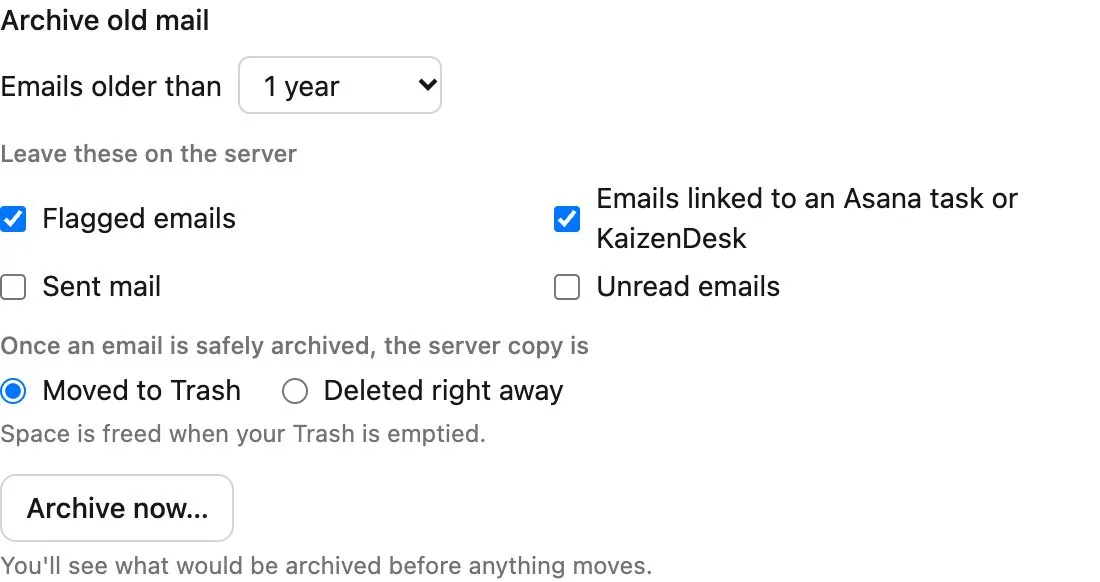
Treeoge connects to the mailbox over IMAP, the same way a phone does. Your address stays at the host. On the mailbox storage page you can archive mail older than a period you choose. The default is a year.
You get a preview first: how many messages, how much space, and how full the box will be after. Flagged mail stays on the server, and so does mail linked to an Asana task or a KaizenDesk record. You can also keep Sent and unread mail.
Treeoge checks the archived copy before the server copy is moved to Trash. Space is freed when Trash is emptied. You can choose delete-right-away instead. A rule can repeat this every week, or when the mailbox passes a fullness level you set. The usual level to start from is 85 percent.
Archived mail still opens in Treeoge. You can search it, reply, and forward. The host’s webmail and your phone will not show it, because it is no longer on their server. You can put it back on a mailbox later.
If Roundcube is what you use to read this same account, the warning looks different there. See Roundcube mailbox full. For the archive steps in one place, see how to archive IMAP emails.
Keep the account you already pay for
You do not have to move the company onto Gmail to get out of a cPanel mailbox full state. Treeoge reads the mailbox you have. See how that connection works.