How to Archive IMAP Emails Off the Server
Hosts tell you to archive IMAP emails by saving them on the computer in front of you. That frees the server. It also hides the mail from every other phone and from anyone else who reads the same mailbox. A quota problem becomes a “which PC was that on?” problem.
IMAP keeps mail on the server so every app can see it. That is why the box fills. Archiving has to take a copy off that server and still leave a way to open it.
What people usually do
Thunderbird, Apple Mail, and Outlook can move messages into a local folder. Outlook’s version is a data file that lives on one machine. The host’s quota drops after the server copy is gone. The other devices drop the messages too, because IMAP has nothing left to sync.
A backup tool that only copies mail, and leaves it on the server, does not fix a full mailbox. The quota is unchanged. You want the copy off the server, and you want it somewhere more than one person can open.
IMAP itself has no archive command. The server stores mail until a client deletes it or moves it somewhere else. “Archive” in many apps is just another folder on that same server.
How to archive IMAP emails in Treeoge
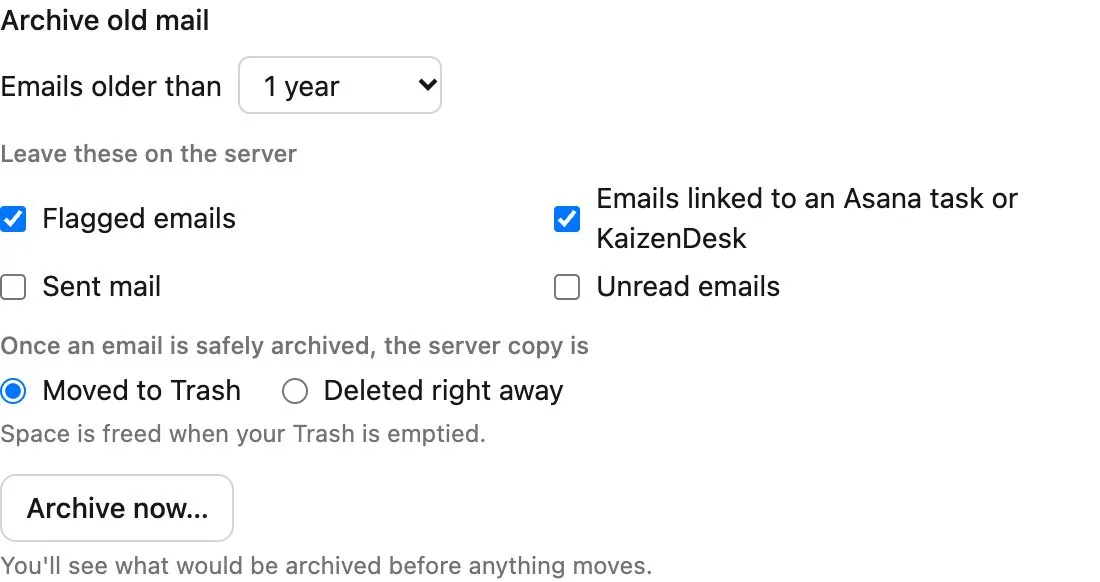
Connect the mailbox, then open its storage page. You choose how old the mail must be. The starting point is one year. A preview lists how many messages would move and how full the box would be afterward.
Two kinds of mail stay unless you change it: flagged messages, and messages linked to an Asana task or a KaizenDesk record. Sent and unread can stay too. Treeoge writes an encrypted copy, checks it, and only then moves the server copy to Trash. Emptying Trash is what frees the quota. You can delete from the server immediately instead.
Run it once, or set a rule: every week, or when the mailbox passes a percent full. The level you start from is 85 percent. The job runs in the background.
Afterward you still open the message in Treeoge, search it, reply, and forward. Phones and the host’s webmail do not list it, because they only see the server. You can restore archived mail onto a mailbox later. A .pst, .mbox, or .eml backup can also be brought into the archive.
The same squeeze shows up as cPanel mailbox full or GoDaddy email storage full, depending on the host. The mailbox you already have is the one Treeoge connects to. See how that works.