How to Get Business Mileage from Calendar Events
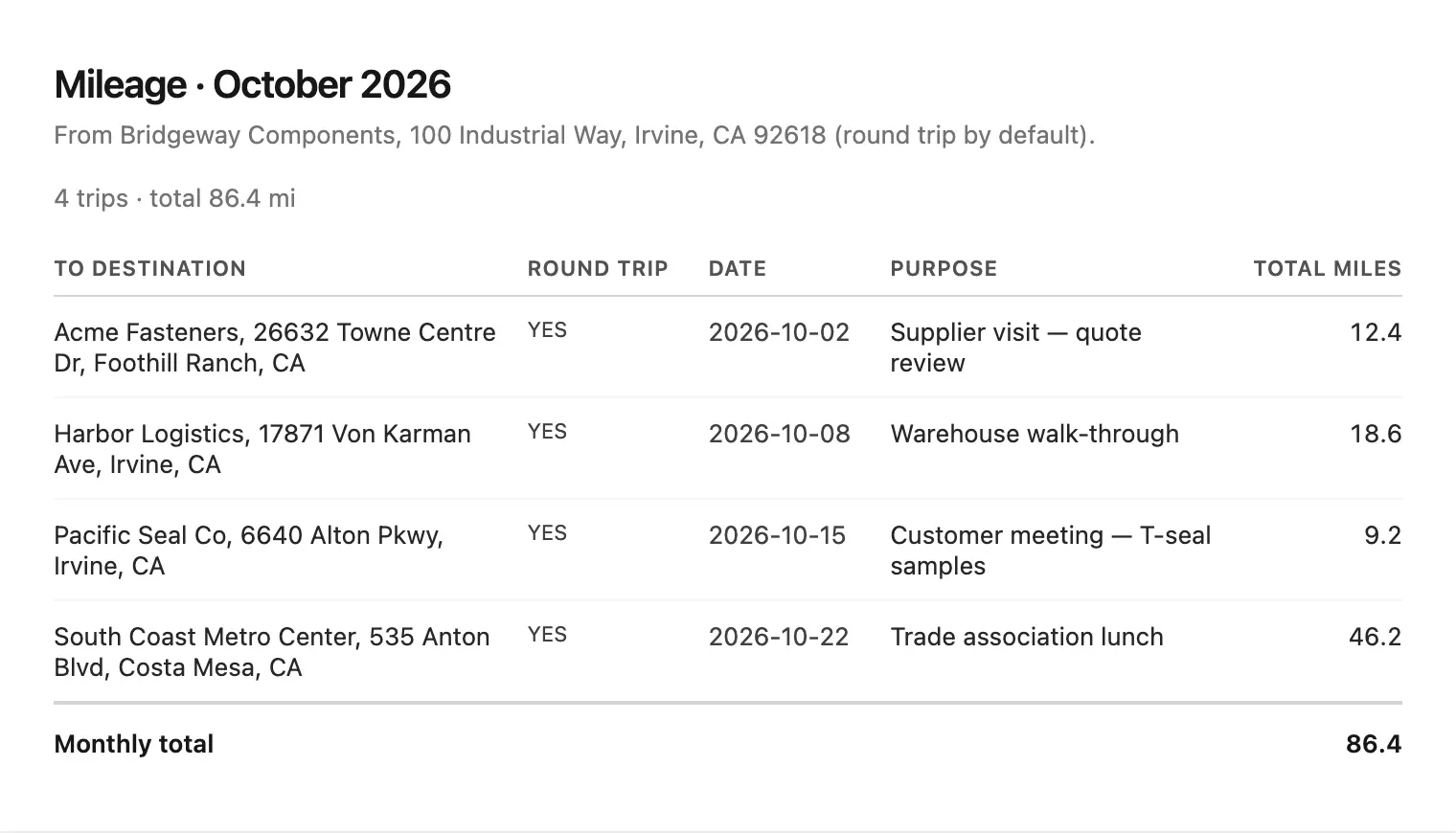
GPS mileage apps assume you drive for a living. Many people do not. You leave home for a customer visit, a supplier meeting or a site walk-through, then you go back. Your calendar already knows those stops. Mileage from calendar tools turn those places into a mileage log, without tracking your phone all day.
That is a better fit for meeting-based travel than a tracker that runs in the background.
Why GPS trackers frustrate meeting-based work
Always-on trackers are built for routes that never stop. They drain battery. They watch your location. They also log personal errands unless you babysit the categories.
If your business miles come from appointments, the calendar is the source of truth. Date, destination and purpose are already on the event. The missing piece is the driving distance.
How mileage from calendar works
The pattern is the same across good tools:
- Set a home or office address. That is the start of each trip.
- Read events that have a place. Video calls and bare meeting links do not count as drives.
- Calculate the route. Usually a round trip: home → place → home.
- Review the report. Fix a bad address, drop a personal visit, then print or download CSV.
IRS guidance on what belongs in a mileage log still expects you to keep records. A calendar report helps you build them. It is not tax advice, and it is only as good as the locations you put on events.
Mileage from calendar vs always-on GPS
| Calendar report | GPS tracker | |
|---|---|---|
| Best for | Customer and supplier visits on the schedule | All-day driving jobs |
| Privacy | Uses event addresses you already saved | Continuous location |
| Catch-up | Rebuild a past month from the calendar | Hard if the app was off |
| Gaps | Drives you never scheduled stay missing | May over-capture personal trips |
Put a full street address in the location field when you book the meeting. “Acme” will not geocode. “6640 Alton Parkway, Irvine, CA” will.
How Treeoge builds a monthly mileage report
Treeoge’s calendar includes a mileage report for people who already plan work as events. You save a mileage home address in Calendar settings. Open Mileage for a month. Treeoge finds visible events with a real place, skips declined and cancelled meetings, and skips Zoom, Teams and Meet-style locations. Each counted event becomes a round trip from your home address. You can edit the destination, purpose or miles, refresh one row, remove a trip, then print or download CSV.
The report lives next to the same calendar you use for invites and travel time. You do not need a second mileage app for meeting-based miles.
For calendar setup on hosted mail, see IMAP calendar. For turning visit follow-ups into work after the drive, see create tasks from emails on iPhone.
Try it on your own schedule with a 14-day trial.
FAQ
Does mileage from calendar need GPS on my phone?
No. Distances come from map routing between addresses, not from live tracking.
What if a meeting has no location?
It is skipped. Add a street address when the visit is a real drive.
Can I fix miles after the report runs?
Yes, in Treeoge. Edit the row, refresh miles for a new address, or remove the trip before you export.
Is a calendar mileage report enough for taxes?
Keep whatever records your adviser or employer requires. The report is a log you can review and export, not a filing.