GoDaddy Calendar Sync That Actually Sticks
GoDaddy calendar sync is the step after the mailbox already works. Mail arrives on the phone. Meetings do not. Or they show in GoDaddy webmail and nowhere else. The usual guides send you back through the same wizard, and the calendar is still empty the next morning.
GoDaddy has more than one mail product, so the sync steps are not one recipe.
What GoDaddy calendar sync is trying to do
GoDaddy’s help tells you how to sync a GoDaddy calendar with other calendars and how to add a Professional Email calendar to a phone. Those articles matter if you are on GoDaddy’s own mail and the plan actually includes a calendar.
Two limits show up often. The phone added IMAP mail, which has no events to sync. And Microsoft 365 bought through GoDaddy is Microsoft’s calendar. Treeoge does not connect to Microsoft 365 or Outlook.com. A GoDaddy calendar sync problem on Microsoft 365 is Microsoft’s setup, not an IMAP switch you can flip.
Professional Email is often Titan under GoDaddy’s name. Titan’s calendar lives in Titan’s webmail. Getting it onto a phone is Titan’s instructions, which still may not share “busy only” with a coworker.
A calendar that does not depend on that sync
Treeoge keeps the mailbox you already have, when that mailbox allows other email apps over IMAP. The calendar can be separate from GoDaddy’s.
Treeoge can host one calendar per person. An iPhone adds it as a CalDAV account with the server, username, and password shown in settings. Outlook can do the same with a CalDAV plugin. The mail account on the phone stays the GoDaddy one. The calendar account is this one. They do not have to be the same login.
You can also connect a calendar server you already use: iCloud, Fastmail, Yahoo, or your own, such as Baïkal or Nextcloud. Paste the address and sign in.
Google and Microsoft can subscribe to a read-only link. Changes made in those apps do not come back.
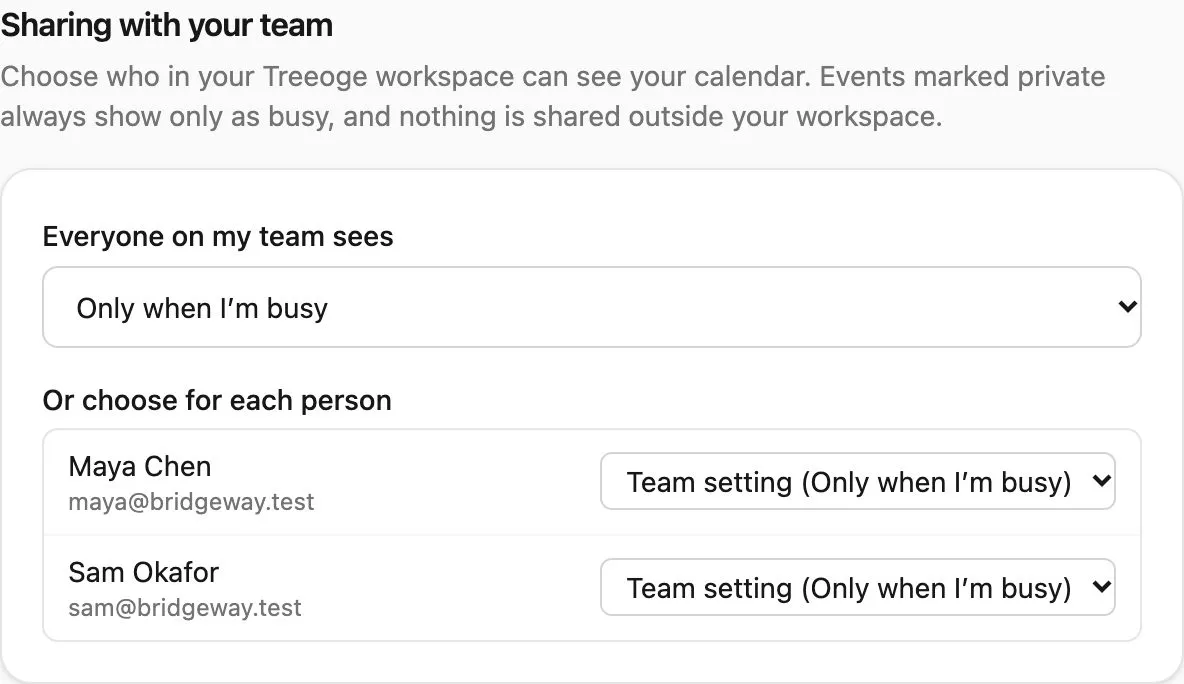
Teammates in your Treeoge workspace can see nothing, only when you are busy, or the full event. Private events stay busy-only. When an email says let’s meet, the assistant drafts from those real free times and opens the event for you to check. You press Send.
If the address is Titan, start with Titan email calendar. Why mail sync never included events is in IMAP calendar.