cPanel Calendar Sharing for a Small Team
cPanel calendar sharing sounds like the Google feature a small team wants: open a calendar, see who is free, book the call. On a lot of hosts the result is narrower. One person can see their own webmail calendar. The rest of the company cannot.
The mailbox is fine. The share is the part that stalls.
What cPanel calendar sharing includes
cPanel can offer calendars and contacts beside the mailbox, and a share screen for them. The official notes are in Calendars and Contacts Sharing. What you get still depends on the host. Some plans hide the feature. Some share only with another mailbox on the same server. A phone may need a separate CalDAV setup before it shows anything.
That is a different job from forwarding mail. Sharing a calendar means other people can read events, and sometimes change them, without using your mailbox password. If the host never turned that on, there is no button that invents it.
A public link, when the host has one, is usually the whole calendar. You cannot hand a coworker “only show me when you are busy” and keep the customer names to yourself.
What a team actually needs
Most small teams do not need to edit each other’s meetings. They need to know whether Thursday at 2 is taken. They also need a new person to see that without a ticket to the host.
The people in question already share a company. They do not necessarily share one Google account, and they should not share one mailbox password.
cPanel calendar sharing inside Treeoge
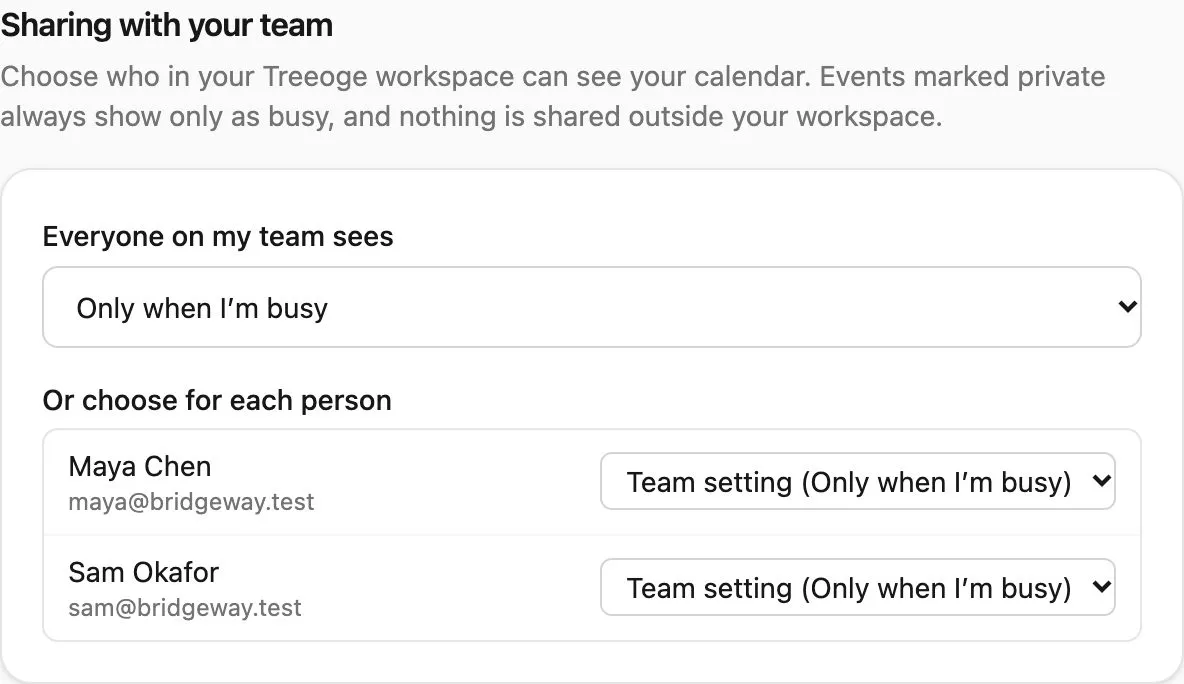
Treeoge does not replace cPanel’s share screen with a patched version of it. It gives the workspace its own choice. Each person sets a team default: nothing, only when they are busy, or the full event. Any one teammate can be different. Events marked private always show as busy. Shares stay inside the workspace.
The calendar can be one Treeoge hosts, or a CalDAV calendar you connect, including a cPanel CalDAV address when the host gives you one. Teammates see the level you picked. They do not need a cPanel login.
When an email asks to meet, the assistant uses those real free times, including teammates who share at least busy. It drafts the reply and opens the meeting in a form. You send it yourself.
How the phone gets the calendar is a separate setup, covered in cPanel CalDAV calendar. Why the mail account never included a calendar is in IMAP calendar. Roundcube’s own calendar has the same team gap: Roundcube calendar.